Convert PDF to Markdown for AI — ChatGPT, Claude & LLMs
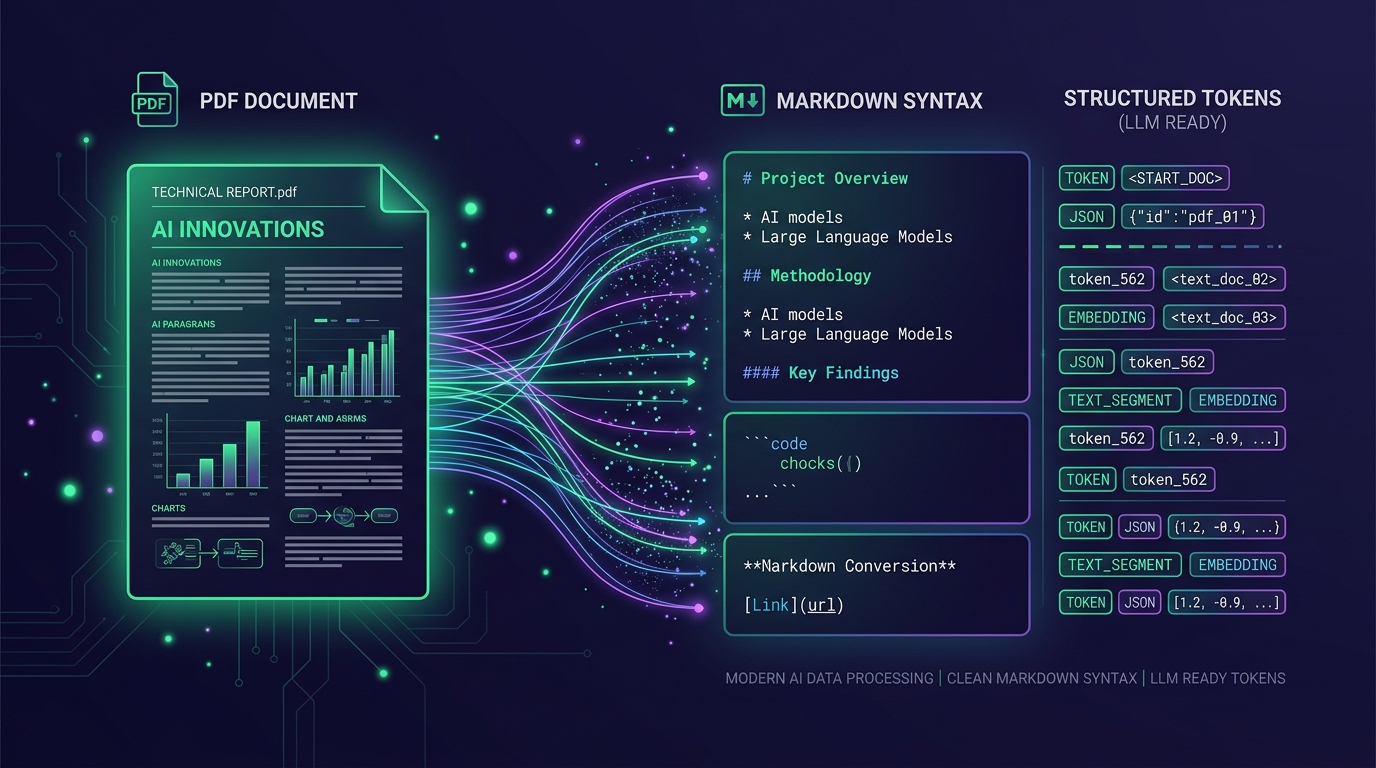
Feeding raw PDF files or noisy text dumps into Large Language Models (LLMs) degrades accuracy, wastes up to 85% of your context token budget, and garbles tables and equations. When you convert PDF to Markdown for AI, you transform complex multi-column documents into clean, semantic syntax that models like Claude 3.5 Sonnet, ChatGPT (GPT-4o), and local LLMs natively comprehend. This comprehensive engineering guide explains how to convert documents to markdown with AI, why Claude and LLMs excel with Markdown structure, and how to prepare high-accuracy document corpora for AI workflows.
1. Why Convert PDF to Markdown for LLM & Claude Context Windows?
Portable Document Format (PDF) was architected in 1993 for visual fidelity on computer screens and physical printers—not for machine intelligence. A PDF file encodes absolute vector coordinates (X, Y positioning of characters) rather than semantic text flow. When developers extract raw strings or pass raw page images directly to frontier LLMs, they encounter severe token bloat and hallucination.
Converting PDF to Markdown for LLM workflows solves these core architectural bottlenecks by stripping away presentation metadata while elevating document hierarchy into lightweight, universally parseable CommonMark syntax.
1.1 Token Economy: 75% to 85% Reduction in Context Overhead
Frontier multimodal models charge high token fees for visual page scans: sending a 40-page PDF as images to GPT-4o or Claude 3.5 Sonnet consumes between 64,000 and 120,000 tokens before any prompt instruction is processed.
When you convert documents to markdown with AI, the identical 40-page document is condensed to just 12,000 to 18,000 tokens of high-density semantic text. This drastic reduction eliminates context window exhaustion, slashes inference latency by up to 4x, and eliminates unnecessary token expenditure.
1.2 Native Markdown Pre-training in Claude and ChatGPT
Modern foundation models are trained extensively on internet-scale codebases, GitHub repositories, technical documentation, and Wikipedia—all stored natively in Markdown. As a result, LLMs possess innate structural reasoning over Markdown syntax.
Headings (#, ##, ###) inform the model of document hierarchy, bulleted lists maintain categorical groupings, and GitHub Flavored Markdown (GFM) pipe tables (| Header 1 | Header 2 |) provide explicit row-and-column coordinate awareness that prevents column-bleeding errors common in raw string extractions.
1.3 Optimizing PDF to Markdown for Claude Projects & Artifacts
For Anthropic Claude users leveraging Claude Projects or Claude Artifacts, uploading clean Markdown (.md) files instead of monolithic PDFs enables Claude to cross-reference citations with precision. Claude understands the boundaries between sections, avoiding the dreaded lost-in-the-middle phenomenon during extensive Retrieval-Augmented Generation (RAG) queries.
A 50-page complex financial PDF ingested as vision tokens costs ~80,000 tokens. Converted to clean Markdown with FileMarkd, the same content uses only ~13,500 tokens—an 83.1% token saving with superior data comprehension.
2. How to Convert PDF to Markdown with AI vs Traditional OCR
For years, engineers relied on legacy PDF text extractors (such as PyPDF, pdfminer, or Poppler) and heuristic OCR tools (such as Tesseract). However, real-world business and research documents break traditional parsers.
2.1 The Critical Failures of Legacy PDF Parsers
• Multi-column layout scrambling: Academic papers and newspapers with 2 or 3 columns are merged horizontally, creating nonsensical interleaved sentences.
• Lost tabular associations: Tables are flattened into disorganized text fragments with missing cells and decoupled headers.
• Phantom artifacts: Running headers, page numbers, and copyright footers are injected repeatedly into every page, confounding retrieval embeddings.
• Mangled mathematical symbols: Greek letters, integrals, and fractions in STEM papers turn into unicode gibberish.
2.2 Vision-Language AI Models: True Semantic Document Understanding
Modern document converters like the FileMarkd PDF to Markdown converter combine specialized vision backbones with layout-aware LLMs. Instead of blind character scraping, the AI analyzes visual reading orders, recognizes table boundaries, extracts LaTeX mathematical notation ($$ E = mc^2 $$), and preserves code blocks.
By utilizing AI to understand layout intent, the converter outputs clean CommonMark and structured JSON that mirrors the author's original document structure.
2.3 Converting Mixed Documents to Markdown with AI at Scale
Modern RAG architectures do not just deal with PDFs; enterprise repositories contain Microsoft Word (.docx), PowerPoint (.pptx), Excel (.xlsx), and scanned TIFF/JPEG forms. Modern AI conversion pipelines normalize all these heterogenous sources into uniform Markdown schemas, creating a standardized ingestion vector for embedding models.
Image-only assets take the same vision pipeline without a document wrapper: PNG to Text and Extract Text from Pictures read diagrams, whiteboard exports, and photographed pages straight into Markdown.
3. Technical Benchmark: PDF Parsing Methods Compared
To illustrate the real-world performance differences across common extraction techniques, here is a benchmark evaluation comparing traditional text extraction, open-source OCR, raw multimodal prompting, and dedicated AI document conversion:
Do not chunk documents by fixed 500-token windows. Instead, split along Markdown header boundaries (## and ###). This keeps full conceptual topics intact within individual vector chunks, dramatically boosting similarity search retrieval accuracy.
| Parsing Method | Table Retention | Math / LaTeX | Multi-Column Flow | Token Efficiency | LLM Readiness |
|---|---|---|---|---|---|
| PyPDF / pdfminer | Poor (flattened) | Broken | Scrambled | Moderate | Low (needs heavy cleanup) |
| Tesseract OCR | Fair (text only) | None | Poor | Low (OCR noise) | Low (OCR typos) |
| Raw Vision LLM (Per Page) | Good | Good | Good | Very Poor (1.6k+ tok/pg) | Moderate (cost prohibitive) |
| FileMarkd AI Engine | Flawless (GFM & JSON) | Native LaTeX | Preserved 100% | Excellent (optimal md) | High (RAG-ready) |
4. Practical Guide: Converting Documents to Markdown Online with FileMarkd
Rather than wrestling with local command-line dependencies, compiling complex OCR engines, or writing fragile scraping scripts, you can convert PDFs to Markdown in your browser on FileMarkd — no signup required.
4.1 Fast Browser-Based Document Processing
1. Visit FileMarkd PDF to Markdown and drag-and-drop your PDF file into the converter. For other formats, use Word to Markdown for .docx, Excel to Markdown for .xlsx, or Extract Text from Pictures for scans and screenshots.
2. Select your desired target output: Standard Markdown (.md) or Structured JSON (.json).
3. FileMarkd's layout engine analyzes document hierarchy, recognizing headings, nested lists, and multi-column flows.
4. Preview the rendered Markdown in real time side-by-side with original document pages.
4.2 Direct Export to Claude Projects, ChatGPT & AI Notebooks
Once the conversion completes, you can download the generated `.md` file or click "Copy Markdown" to instantly paste clean text into:
• Claude Projects: Add the `.md` file to your project knowledge base for deep multi-document synthesis.
• ChatGPT Custom GPTs: Upload as reference documents to knowledge files without exceeding upload size limits.
• NotebookLM & Research Tools: Ingest clean text notes that preserve citations, tables, and section headings.
5. Python Data Ingestion: Semantic Chunking for RAG & Vector Databases
After downloading your converted Markdown file from FileMarkd, integrating it into Python AI pipelines (such as LangChain or LlamaIndex) is clean and straightforward. Because Markdown uses semantic headers (#, ##, ###), you can split documents logically rather than splitting mid-sentence with arbitrary character counts.
5.1 Semantic Header Splitting with LangChain
Here is an example demonstrating how to load a converted Markdown file and split it into clean, context-rich chunks for vector search embedding:
from langchain.text_splitter import MarkdownHeaderTextSplitter

# 1. Read your converted Markdown file generated by FileMarkd
with open("annual_financial_report.md", "r", encoding="utf-8") as f:
    markdown_document = f.read()

# 2. Define the header hierarchy to preserve context
headers_to_split_on = [
    ("#", "Header_1"),
    ("##", "Header_2"),
    ("###", "Header_3"),
]

markdown_splitter = MarkdownHeaderTextSplitter(
    headers_to_split_on=headers_to_split_on,
    strip_headers=False
)

# 3. Create semantically intact chunks
chunks = markdown_splitter.split_text(markdown_document)

print(f"Total semantic chunks created: {len(chunks)}")
for i, chunk in enumerate(chunks[:2]):
    print(f"--- Chunk {i+1} Metadata: {chunk.metadata} ---")
    print(chunk.page_content[:200] + "...\n")
6. Prompt Engineering: Feeding Converted Markdown to Claude & ChatGPT
Because Markdown is clean, plain text, you can embed entire converted documents directly into your prompt templates without risking format corruption.
6.1 Structuring Prompts with XML Tags for Claude 3.5 Sonnet
Anthropic models excel when context documents are wrapped in explicit XML tags. This clearly separates system instructions from user-provided source materials:
# Prompt template with clean Markdown context
prompt = f"""You are an expert research analyst.
Please review the financial document below and answer the user query accurately based ONLY on the provided context.

<document format="markdown">
{markdown_document}
</document>

Query: Compare Q3 operating revenue against the forecast in Table 2, and list the key variance drivers."""
7. Summary & Getting Started
Transforming unstructured PDFs into clean, semantic Markdown is the single highest-ROI optimization you can make for your LLM context windows, Claude Projects, and RAG architectures. It minimizes token expenditure, eradicates hallucinations caused by broken multi-column layouts, and guarantees flawless table parsing.
Ready to test your documents? Try FileMarkd PDF to Markdown to convert PDFs into clean Markdown online — or start from What Is a Markdown File? if you are new to the format. Zero installation, instant browser downloads.
7.1 Key Takeaways for AI Engineers
• Stop sending raw PDF page images to vision LLMs: convert to Markdown first to slash token costs by up to 85%.
• Leverage native Markdown pipe tables and LaTeX formatting for 100% precision in financial and STEM data extraction.
• Use semantic Markdown header splitting (##, ###) for superior vector database indexing and retrieval accuracy.